Why this one matters to me
I have always wanted to learn American Sign Language. Handshape is the tool I wanted for it.
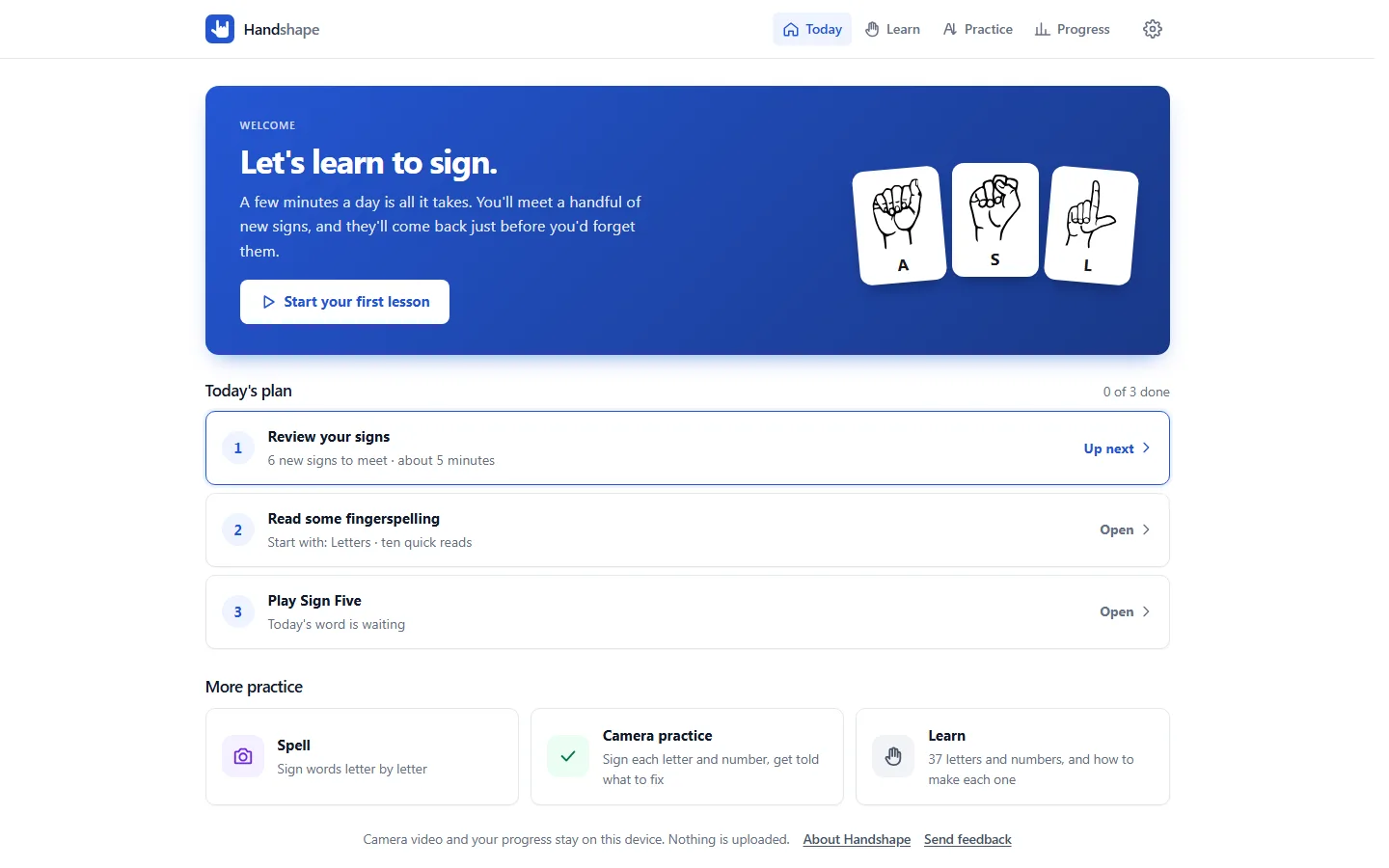
A chart can show you 26 handshapes, but it can't tell you that your thumb is in the wrong place, or that the letter you just made looks more like an S than an A. So I built an app that watches your hand through your camera and tells you, in plain words, the one thing to fix. It runs entirely in the browser, with no account and nothing uploaded.
The logo is the ASL "I love you" handshape: thumb, index finger and pinky up, the middle and ring fingers folded. It is the letters I, L and Y signed at once, and it is probably the most recognized handshape in ASL. It felt like the right mark for a project I had wanted to make for a long time. Fittingly, I, L and Y also turned out to be among the hardest letters for the camera to tell apart.
What it does
- Learn the signs. The 26 letters and the numbers 0 to 10, each with a picture, how to make it, which way the palm faces, and the signs it gets mixed up with.
- Review a little each day. A spaced-repetition queue (FSRS) introduces a few signs at a time and brings each one back just before you would forget it. Cards go both ways: see a sign and type what it means, or see a letter and make the sign.
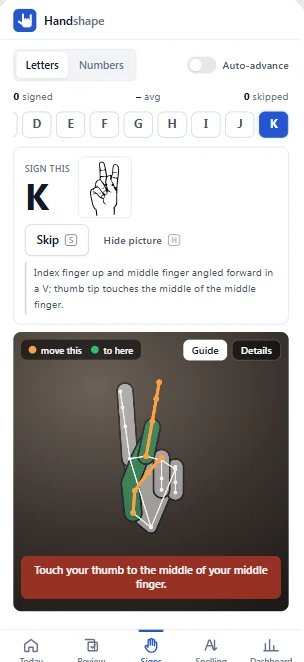
- Practice on camera. Make a sign and get told what to fix: "Straighten your index finger", "Turn your palm to face you", "Touch your thumb to the middle of your middle finger".
- Read fingerspelling. Reading other people's spelling is the hard part, so it has its own module: short levels for letters, look-alike letters, words and numbers, plus a drill built from the letters you keep mixing up.
- Spell words to the camera, letter by letter.
- Play Sign Five, a daily five-letter word game where you fingerspell each guess. A thumbs up enters the guess and a thumbs down deletes a letter.
- Track progress on a dashboard, with your own word lists and a JSON export of everything.
How the camera check works
Tracking. MediaPipe's hand landmarker runs in the browser (WebAssembly, GPU with a CPU fallback) and returns 21 points per hand per frame. The model and engine, about 22 MB, download the first time the camera is used and are cached for offline use after that.
Measuring. Each frame becomes a set of measurements relative to the hand's own size: how bent each finger is, split into the bend at the knuckle and the bend in the finger itself; the spread between fingers; where the thumb tip sits across and along the hand; which way the hand points; which way the palm faces.
Rules. Each sign is a short list of readable checks over those measurements, and each check carries the hint to show when it fails. Checks the camera often gets wrong, like a thumb tucked behind the fingers in M, N or T, are marked as advice: they show a hint but never block a match.
Telling look-alikes apart. The hardest problem was not recognizing a sign, it was making sure one hand can't pass for two. Each confusable pair is separated by a single shared test that one sign requires and the other forbids:
| Pair | The test |
|---|---|
| T and X | Does the index finger stand up off the fist? |
| 2 and 3, 4 and 5, I and Y, L and Z | Does the thumb stick out, with its tip outside the index knuckle? |
| K and P | Does the middle finger point at the floor? |
On top of that, a sign that only matches loosely loses to any other sign the hand matches fully, so one fist can't count as A, E, M, N, S and T alike.
Hints that say what the camera sees. Early on the app told people to "straighten" a finger that was already straight but leaning forward at the knuckle, which is exactly how K and P are made. Splitting knuckle bend from finger bend fixed both the check and the wording: "Your middle finger is leaning forward at the knuckle. Lift it up in line with your palm."
A guide hand. Turn on Guide and the target handshape is drawn over your own hand, sized to it and pinned to your wrist, with the finger to move highlighted in two colors: move this on your hand, to here on the guide. The guide is a small kinematic hand built from joint angles, the same model the tests use. Its size comes from fitting the tracker's 3D points to the picture, so it doesn't shrink when you tip your hand toward the camera.
Letters drawn in the air. J and Z move. Once the starting handshape is held still, the app follows the pinky or index fingertip, resamples the stroke, compares it with the letter's shape, and applies a few structural checks (a J needs its hook, a Z its three strokes) so a dropping hand can't pass. A correct letter drawn mirrored counts, with a tip.
Staying calm on a phone. A sign has to be held for about half a second, readings that flicker for a frame or two are forgiven, and on-screen messages only change once the new one has held for 0.4 seconds, so the text doesn't twitch as your hand wobbles.
Reading practice
Receptive skill (reading someone else's fingerspelling) is what learners struggle with most, so it got its own module:
- Three tracks of levels. Letters (pick the letter from four), look-alikes flashed briefly, words from two letters up to names and places at four letters a second, and numbers up to seven-digit strings.
- Short sessions. Ten reads, eight to pass and unlock the next level, then a summary of what you missed and a button to go over just those.
- Your own mix-ups. Every wrong answer is recorded as "shown X, read as Y". The app builds a level from your most common pairs and uses them as the distractors in other levels.
- A slow look after a fast one. A missed word is laid out letter by letter with the wrong ones marked.
Sign Five
A Wordle-style game played with your hands. The camera types a letter once you hold it steady for about a second, and won't type it again until your hand changes, so one long hold is one letter and a double letter needs a small bounce. J and Z are drawn in the air and replace the I or D typed from the same handshape just before.
The daily word is the day's official Wordle answer when it can be reached. The NYT endpoint doesn't allow other sites to read it, so a small Cloudflare Pages Function relays only the five letters; without it, the game uses its own word of the day. Results share as a picture card with the score signed in ASL.
Privacy and offline
- No account, no analytics, no ads.
- All progress lives in IndexedDB on the device, with JSON export and import.
- The only network request is Sign Five's daily word: a date goes out, a word comes back.
- It installs to a phone's home screen and works offline once loaded.
Testing
About 380 unit tests (Vitest) run the sign rules against the kinematic model hand: every sign's pose must pass its own rules and no other sign's except its true twins (O and 0, F and 9, W and 6), confusable pairs are swept through a range of thumb and finger positions to prove no hand passes both, and "realistic" poses (a T resting the index on the thumb, a relaxed Y) guard against rules that are only right for tidy hands. Recorded hand samples from a real camera can be dropped into the repo and are replayed by the same suite. Lesson content is plain JSON, checked by a schema validator in CI.
What's honest about it
The content hasn't been reviewed by a Deaf signer yet. The descriptions and drawings are my drafts, and the app's About page says so.
The thresholds come from a model hand and my own camera. The recording tool and the test harness for real samples are built, but there are no recordings from other people yet, and different hands, cameras and lighting will need tuning.
It's a start, not the language. ASL has its own grammar and uses movement, facial expression and space. Handshape covers the manual alphabet and numbers, which are one part of it. The best way to learn ASL is from Deaf people.
Some pieces are rough. The animated hand in reading practice is an experiment, the thumb shake in 10 isn't checked yet, and Sign Five's daily answers leave out J and Z until drawn letters are tuned on more hands.
Links
- Live app: handshape.pages.dev (opens in a new tab)
The letter and number pictures are public domain from wpclipart.com.