The problem
I play guitar and I have tried a lot of tuners over time: phone apps, clip-ons, plugins, and pedals. The one I always think back to is my first tuning pedal, a Boss tuner. It was simple, fast, and just felt like part of the setup.
That was the idea behind PitchNode. If I am practicing with tabs or lessons open in the browser, stopping to grab my phone just to tune feels annoying. I wanted a small tuner that was already there, either in the extension popup or sitting in the side panel while I play.
Stack
- Extension: Plasmo, Manifest V3
- UI: React, TypeScript, Tailwind CSS
- Audio: Web Audio API,
pitchfinderwith the YIN detector - Browser APIs: microphone permissions, media devices, side panel
What I built
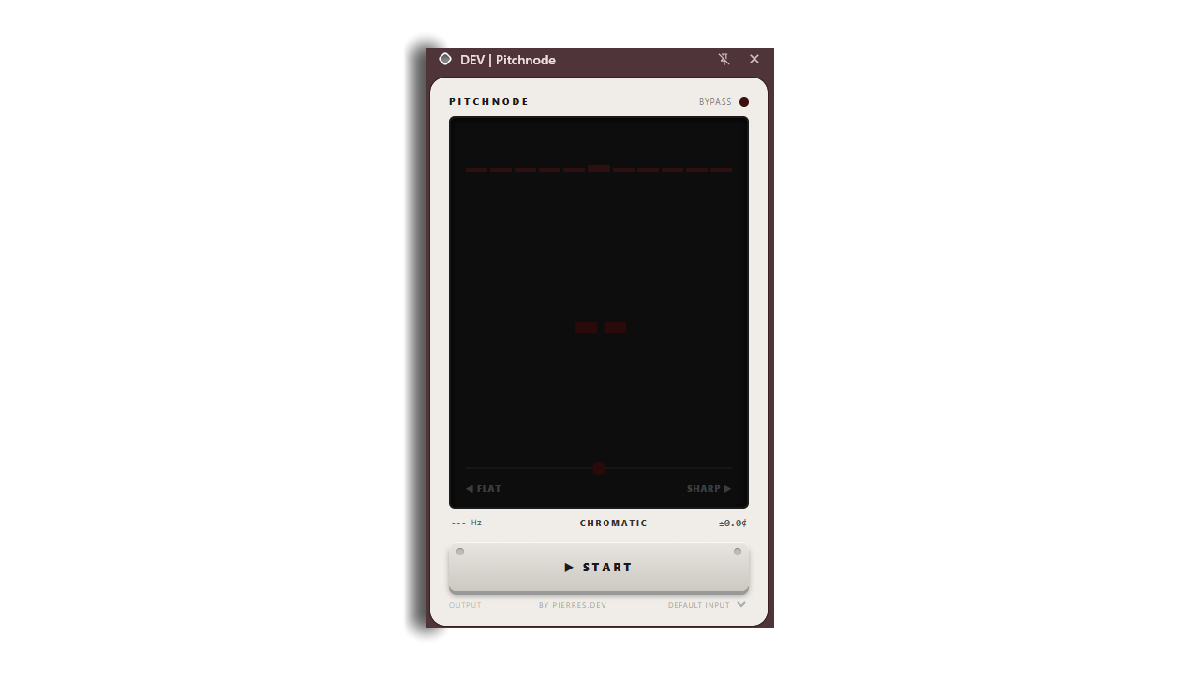
PitchNode listens through the microphone, detects the pitch, finds the closest note, and shows if the instrument is flat, sharp, or in tune.
The popup is for quick tune-ups. The side panel is for when I want the tuner open while I am reading tabs or practicing along with something.
I designed the UI to feel like a guitar tuning pedal, especially that Boss tuner I started with. Dark display, big note readout, flat and sharp indicators, and a stomp-style button.
Both the popup and side panel use the same tuner component, which keeps the two views consistent. I also added microphone selection, saved the selected input, and handled cases where the browser blocks mic access.
The main thing I cared about was making it feel steady. Microphone input gets messy fast, so I added smoothing, frequency limits, and a short hold on the last good note to keep the display from jumping around when the sound fades.
My contributions
- Built the audio capture loop with the Web Audio API.
- Connected
pitchfinderto a real-time detection loop. - Wrote the note resolver for note name, octave, target frequency, MIDI note, and cents offset.
- Added smoothing and hold behavior so the tuner feels less twitchy.
- Built the Boss-inspired popup and side-panel UI.
- Set up the Plasmo extension structure, permissions, and build scripts.
What I learned
PitchNode taught me how messy audio data can be. A microphone signal moves around, spikes, fades out, and sometimes gives you nothing useful for a second. The hard part was deciding what the tuner should show when the input is imperfect.
I used pitchfinder with the YIN detector, which made me spend more time learning how pitch detection actually works. The detector estimates the repeating pattern in the waveform. From there, I still have to turn that raw frequency into something musical: nearest note, target frequency, and cents off from the note.
That also taught me why tuners can feel jumpy. A guitar string has attack noise, overtones, and decay, so the detected frequency can move even when your ear hears one note. Filtering the range, smoothing the reading, and holding the last good value made the tuner feel much closer to the pedal tuners I am used to.
I also got more comfortable building browser extensions. Popups close when they lose focus, side panels stay open, and permission errors need clear handling so the app feels usable.
Mostly, this reminded me why I like making tools for music. A tuner is a small tool, but small tools still have a feel. When it works right, it gets out of the way and lets you keep playing.